Architecture
Microscopy Hackathon 3 is one desktop app with three layers: an assistant (the Harness), an instrument layer (Tango and the device service), and instruments (the Digital Twin or a real microscope). Everything talks through one interface on each boundary, so a microscope and the twin look the same from the assistant's side.
System overview
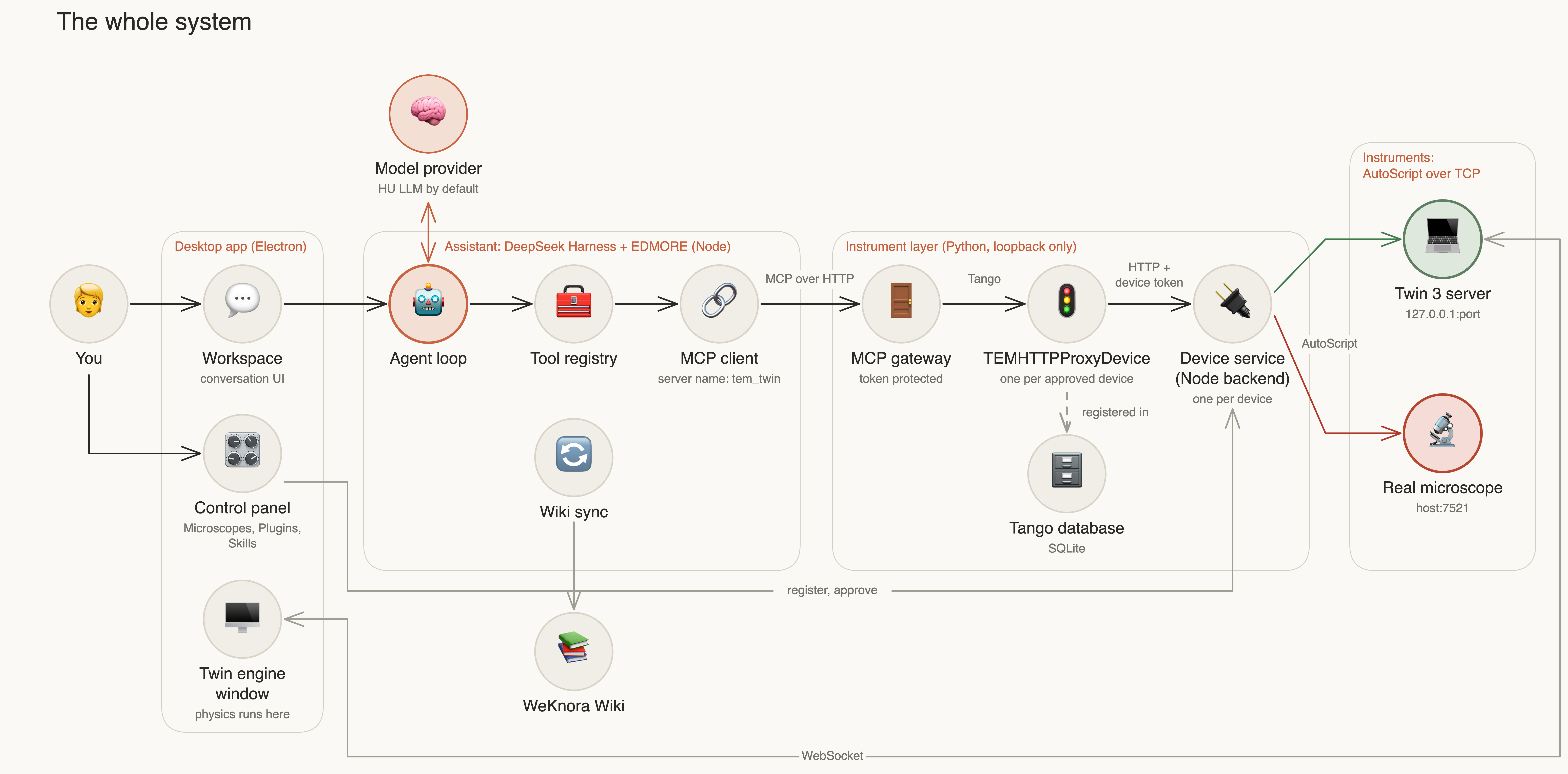
| Boundary | Interface | Why it is there |
|---|---|---|
| Assistant to instrument layer | MCP over HTTP | Tools appear as mcp__tem_twin__<tool>, the same contract as the cloud gateway |
| Gateway to device | Tango | Reuses the existing gateway: device list, one operation at a time, no automatic retry |
| Proxy to device service | HTTP with a per-device token | The Tango device holds no instrument code |
| Device service to instrument | AutoScript | The unmodified Thermo client; only the host and port differ |
The rule that makes this simple: an instrument is an AutoScript host:port. The twin is 127.0.0.1:<port>.
Nothing above the device service knows which one it is talking to, apart from the kind it reports
(simulation or hardware).
What happens when you approve a microscope
Registration and approval both happen on this computer. No server is involved.
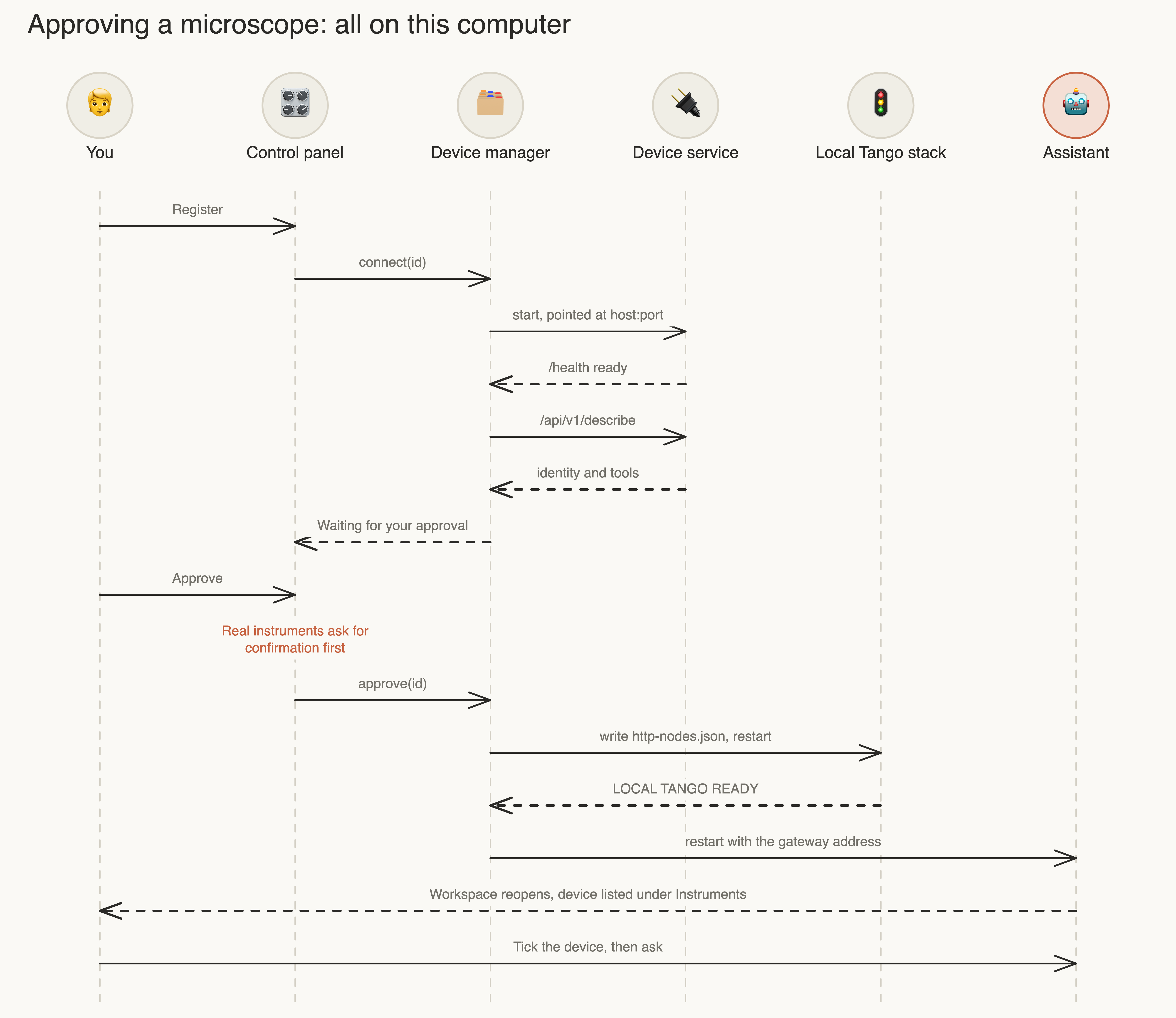
Ticking a device under Instruments is a separate, per-conversation step. A tool call whose device argument is
not ticked in that conversation is refused before it reaches Tango.
What happens on a tool call
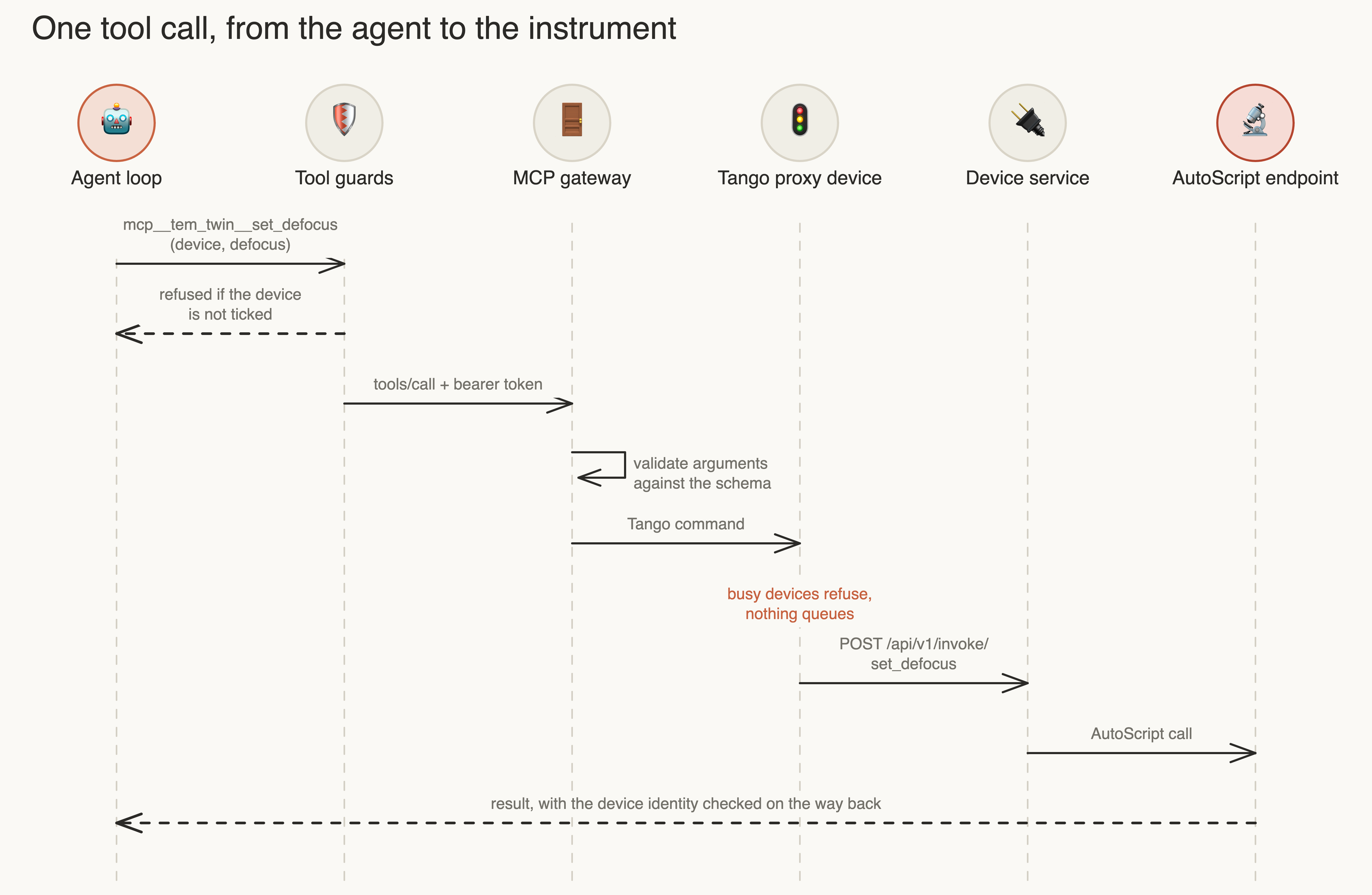
A failed or timed-out call is never retried automatically, because a timeout does not prove the instrument stopped.
Knowledge
The assistant looks things up in a local Wiki. The Wiki is reference only and never runs instrument tools.
Processes
Started by the app. All listen on 127.0.0.1 only, and ports are chosen automatically.
| Process | Started | Stops with | Port |
|---|---|---|---|
| Electron app | You open it | Quit | none |
| Harness client | App launch, after setup | App | 7380 |
| Tango database | App launch | App | Saved in stack.json |
| MCP gateway | App launch | App | Saved in stack.json |
TEMHTTPProxyDevice server |
When a device is approved | App | Saved in stack.json |
| Twin 3 server | First use of the twin | Stop digital twin, or App | Chosen per run |
| Device service, one per device | Register or Connect | Disconnect, or App | Saved per device |
Where data lives
Under Application Support/Microscopy Hackathon 3 on macOS (the Electron user data folder on other systems):
| Path | Contents | Survives an update |
|---|---|---|
runtime/<id>/ |
Installed client, twin, Python environment | No, replaced |
dsh/ |
Sessions, model settings, credentials, profile | Yes |
devices/<id>/ |
Device identity, token, service config | Yes |
devices/tango/ |
Tango database, stack.json, http-nodes.json, stack.log |
Yes |
plugins/ |
Your plugin selection and patch | Yes |
User plugins are installed into runtime/<id>/client/node_modules, so they are reinstalled after an update.
The app never reads or writes ~/.dsh, which belongs to a source checkout of EDMORE.
Trust boundaries
- The gateway token stops other programs on this computer from driving an instrument over MCP. Other local processes running as you can still read the token file, so this is not protection against malware.
- Device tokens protect each device service. They stay in private (
0600) files and never reach a web page. - Approval and instrument selection decide what the assistant can reach.
- There is no per-call confirmation. The package leaves out Plan Judge and Workflow, and no policy asks about
instrument tools, so once a device is ticked the assistant runs them without asking. (The Harness approval plugin is
set to
never, which rejects anything that would ask, rather than prompting.) On a real instrument, stay with it and keep its own interlocks on. - User plugins are trusted code. They run inside the assistant process. See security.
What this package leaves out
The desktop package is Harness and Wiki with the instrument layer. These parts of EDMORE stay in the source tree but
are forced off in desktop/main.mjs and cannot be turned on from settings:
| Left out | Effect |
|---|---|
| Plan Judge, also called the Workflow Engine | No plans, approvals of plans, or workflow UI |
| Jev decisions | No calls to the external Jev service |
Computer use (cua-driver) |
The assistant cannot see or drive your desktop |
| OpenAI provider | Hidden from the model list |
Read next
- Digital Twin: what the twin simulates and how the app hosts it
- Microscopes and Tango: registering devices and the local Tango stack
- Harness design: how the assistant is composed
- Desktop app: packaging and first run