Harness design
This document explains the assistant side of the app: what DeepSeek Harness is, how EDMORE is built on it, and how the pieces fit. It is for people changing or extending the assistant.
Versions described here: @deepseek-ai/dsh 0.2.1-rc.5 and @deepseek-ai/cordis 4.0.5, pinned in
client/package-lock.json. Each Harness package has its own README under
client/node_modules/@deepseek-ai/<package>/README.md, and those are the authority for package behaviour.
What DeepSeek Harness is
DeepSeek Harness (dsh, MIT licensed) is an agent runtime made of
plugins. It has no fixed application: the agent loop, tools, sessions, model providers, the web server and the UI are
all separate packages, and a profile chooses which ones run. Terminal, web, headless and SDK apps are different
profiles of the same launcher.
Three ideas cover most of it:
| Idea | What it is | Where |
|---|---|---|
| Plugin | A Cordis module that uses and provides services | name, inject, apply |
| Bundle | A package holding a cordis.patch.yml: a list of plugins with their configuration |
dsh.bundle in package.json |
| Profile | An ordered list of bundles plus your overrides | $DSH_HOME/profiles/<name>/ |
EDMORE is a Harness application: one bundle, several plugin packages, and the profile edmore-client. It does not fork
the Harness or run a second agent runtime.
Cordis in one page
Cordis is the plugin framework underneath. The Harness uses a build published
as @deepseek-ai/cordis.
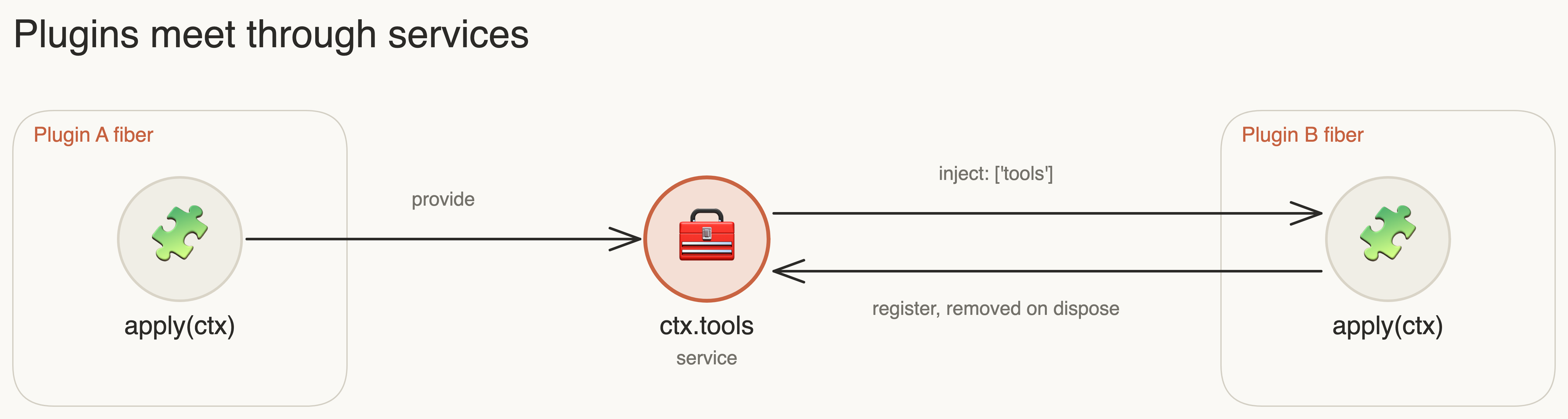
- Context (
ctx) is what a plugin receives. It reaches services and registers things. - Services are shared objects on the context, such as
ctx.toolsorctx.agents. A plugin provides one withctx.provide('name', value). injectlists the services a plugin needs. Cordis holds the plugin as pending until they all exist, which gives start-up ordering without anyone writing an order.- Fibers own lifecycle. Everything a plugin registers is cleaned up when its fiber is disposed, so plugins can be reloaded or turned off.
- Events go through
ctx.on,ctx.emit,ctx.serialand similar.
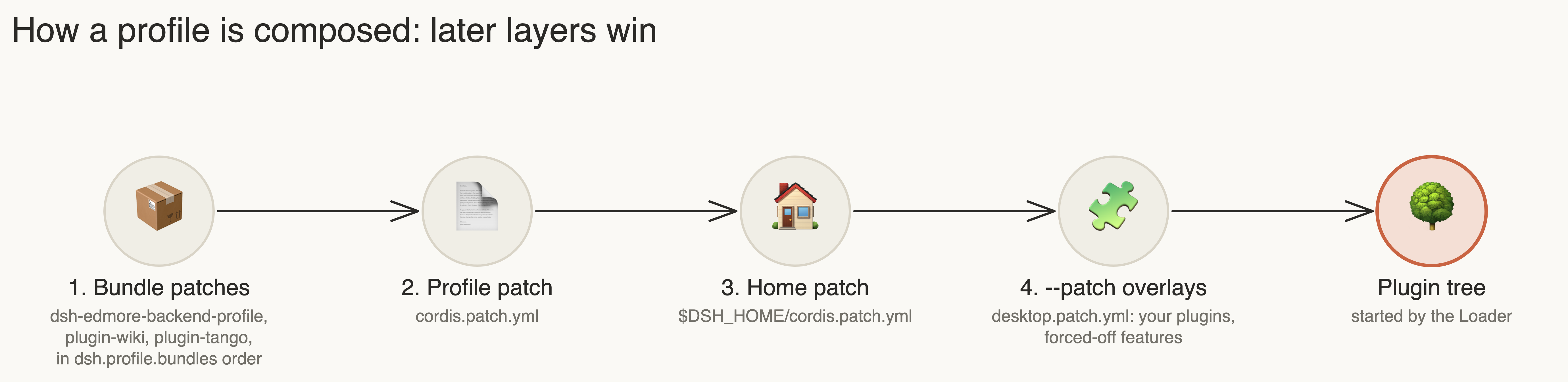
How a profile is composed
Boot builds one plugin tree by layering patches over an empty root, in this order. Later layers win.
A patch is a YAML list. Each row either inserts plugins or changes an existing row by id:
- insert:
    - id: my-plugin
      name: my-plugin-package
      config: { greeting: Hello }
- id: computer-use
  disabled: true
Values may be computed at boot with !!js, for example !!js dshHomePath('edmore/events.jsonl').
Useful commands, run from client/ with DSH_HOME set:
npx dsh --profile edmore-client --dump-config         # the composed tree
npx dsh --profile edmore-client --dump-config-schema  # accepted configuration
How a turn runs
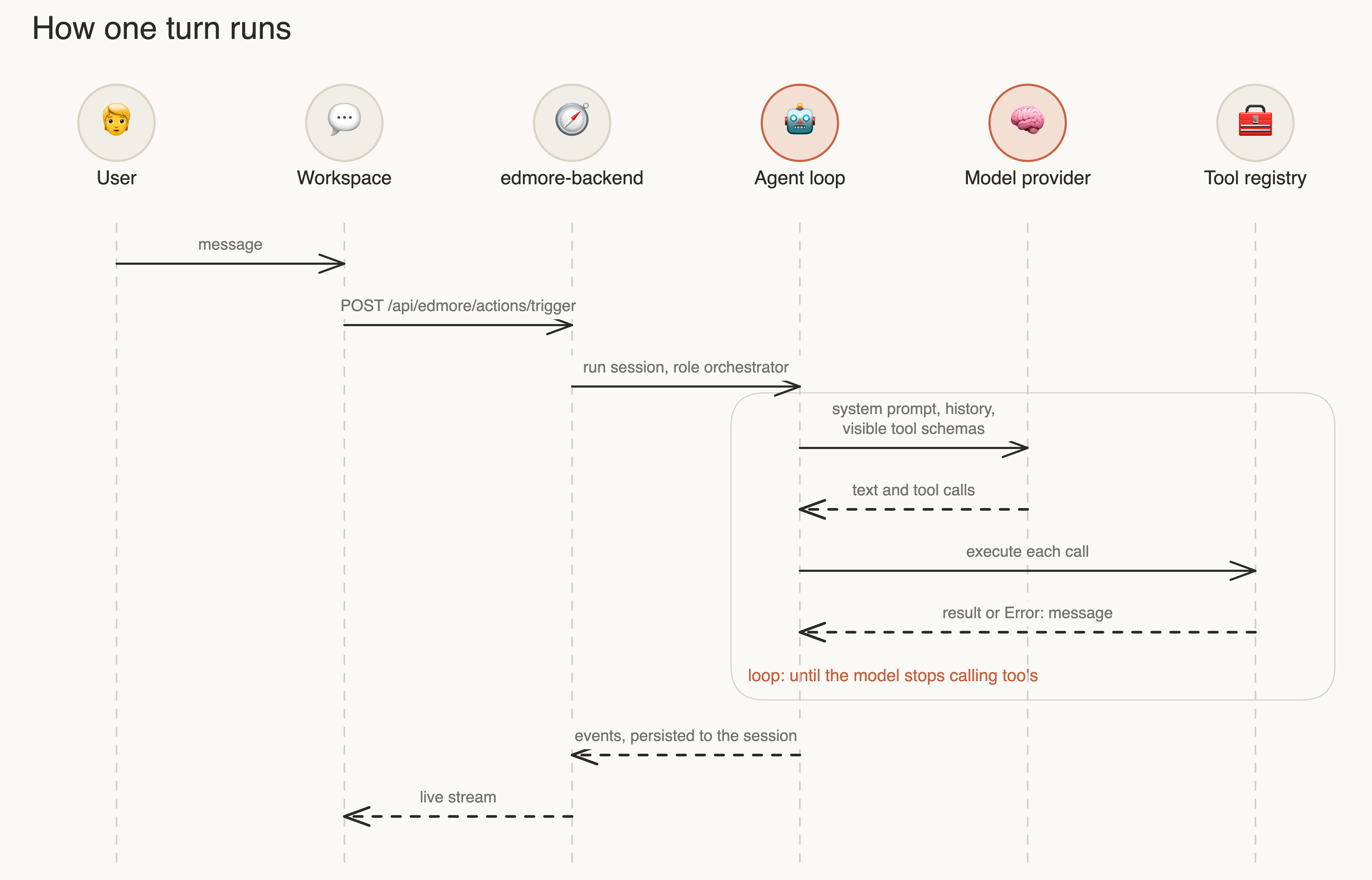
The orchestrator is the agent role you talk to. maxParallelToolCalls is 1 in this profile, so tools run one at a time.
A failed tool call becomes a normal Error: <message> result for the model and does not end the turn.
The tool pipeline
dsh-tools provides ctx.tools. Registering a tool is enough for it to reach the model.

| Hook | Use it for |
|---|---|
ctx.tools.restrict({ allow }) |
Hide tools from one agent; hidden tools cost no prompt tokens |
tools/pre-execute event |
Decide allow, deny or ask |
ctx.tools.guard(fn) |
Owner policy that later listeners cannot override |
tools/execute event |
Wrap dispatch for timeouts or metrics |
EDMORE uses these directly. The Instruments panel denies calls on devices you did not tick through a guard, and role
allowlists use restrict.
MCP
dsh-mcp-client connects to external MCP servers. Tools appear as mcp__<server>__<tool>. In this app the local Tango
gateway is server tem_twin, configured by @edmore/plugin-tango from environment variables the desktop app sets:
| Variable | Value |
|---|---|
EDMORE_TANGO_MCP_URL |
http://127.0.0.1:<port>/mcp |
EDMORE_TANGO_MCP_TOKEN |
Gateway bearer token |
EDMORE_TANGO_SERVER_NAME |
tem_twin |
Skills
dsh-skill keeps one catalog of task instructions, and dsh-skill-filesystem reads SKILL.md files from
client/skills/ and custom folders. A skill is guidance for the model, not code. Skills that declare a
references/workflow.yaml also carry an EDMORE workflow contract, which only applies when the Workflow Engine is on.
In this package they act as ordinary skills. See docs/skill-format-migration.md.
Models and credentials
@deepseek-ai/dsh-edmore-runtime manages provider profiles and stores them in $DSH_HOME/edmore/llm-providers.json.
Keys are held by dsh-credentials-local in $DSH_HOME/edmore/.credentials.yaml, by reference name, and never in
profile files.
| Provider | Source | Notes |
|---|---|---|
HU LLM (llm3-hu, model llm3) |
Built in | Default in the app. Needs no personal key |
| Claude | @edmore/plugin-claude |
Needs ANTHROPIC_API_KEY in Settings |
| Bonsai, Strata | Feature plugins | Deployment dependent |
| OpenAI | Built in | Hidden in the app with EDMORE_HIDDEN_PROVIDERS |
EDMORE_DEFAULT_PROVIDER and EDMORE_HIDDEN_PROVIDERS are set by the desktop app. A source client without them keeps
its previous behaviour.
EDMORE on the Harness
Everything below lives in client/packages/.
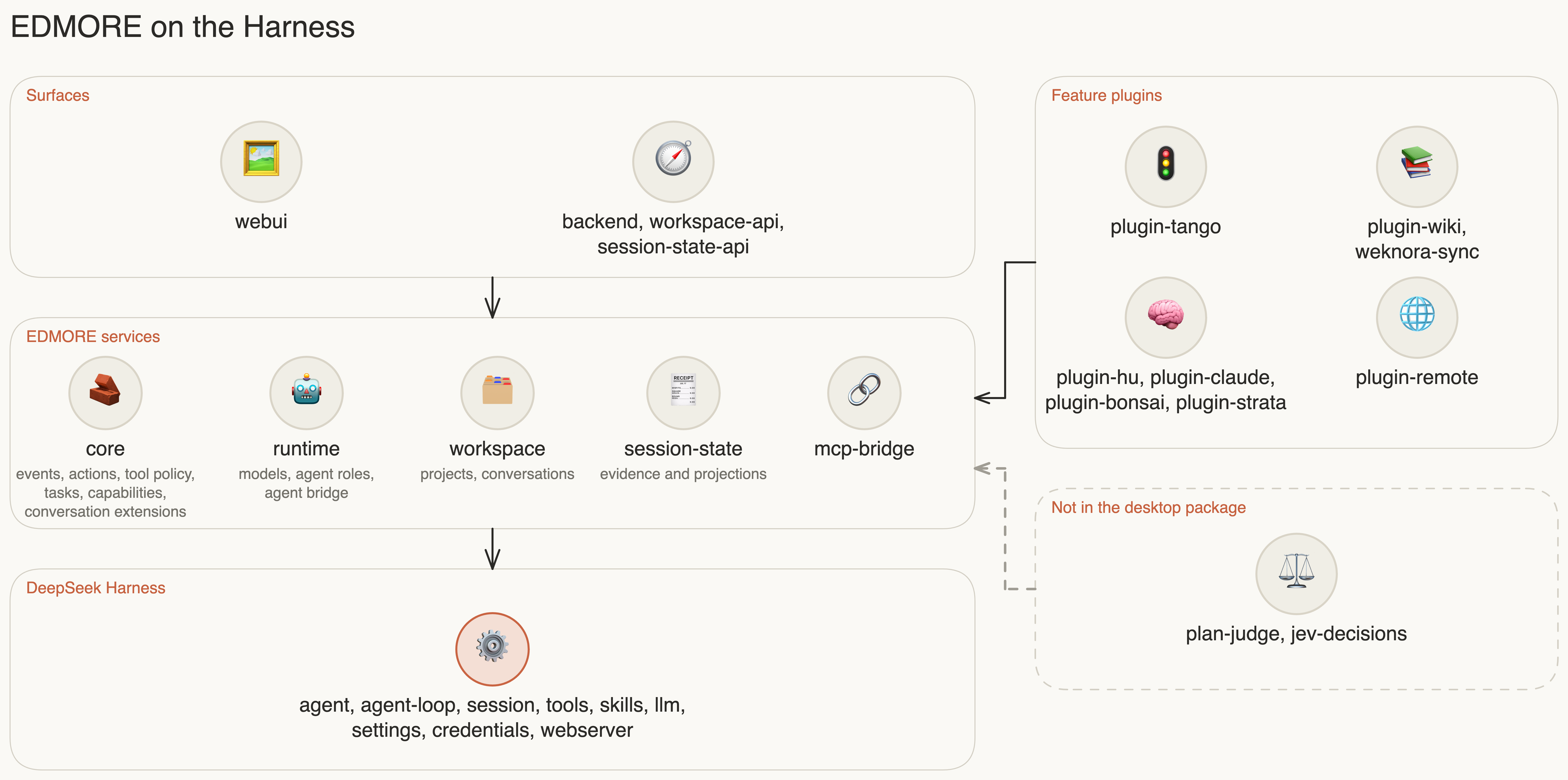
| Package | Responsibility |
|---|---|
backend-profile |
The EDMORE bundle: its cordis.patch.yml is the plugin list |
core |
Required. Provides edmoreEvents, edmoreActions, edmoreToolPolicy, edmoreTasks, edmoreCapabilities, edmoreConversationExtensions |
runtime |
Model providers and agent roles; runs agents on the native loop |
backend |
HTTP API under /api/edmore |
webui |
The workspace page |
optional-feature |
Loads a feature, and reports its status instead of stopping the app if it fails |
workspace, session-state |
Projects, conversations and persisted evidence |
mcp-bridge |
Connects MCP tools to EDMORE events and policy |
plugin-* |
Feature packages with a plugin.json manifest; see feature plugins |
Agent roles
| Role | Tools | Used in the app |
|---|---|---|
orchestrator |
All | Yes, this is the assistant |
title_generator |
None | Yes, names conversations |
planner, judge, executor:* |
Restricted by allowedToolNamesForRole |
No, Workflow Engine only |
Capabilities
GET /api/edmore/capabilities reports each feature's status: ready, unavailable, or for optional features also
loading, blocked and failed. The workspace uses this to adapt: with edmore-plan-judge unavailable it adds the no-workflow class and hides all Workflow UI. A capability
showing unavailable can be normal. edmore-tango reports that even while its tools work.
Conversation extensions
edmoreConversationExtensions lets a plugin add a panel to the workspace sidebar, keep per-conversation state, add to
the prompt, and deny tool calls. Instruments, in
plugin-tango/src/conversation.mjs, is the reference
implementation.
Choosing an extension point
| You want to | Use | Code? |
|---|---|---|
| Teach the assistant a procedure | Skill | No |
| Connect an existing tool server | MCP server in the control panel Settings | No |
| Add a function to the twin | Twin plugin, in the twin's plugins/ folder |
Python |
| Add a tool, event listener or policy | Cordis plugin | JavaScript |
| Add a model provider or desktop feature | Feature package | Built into the app |
Design rules
These are decisions, so check them before changing the design:
- One control path. Instruments are reached through the device service and Tango, not by a second route.
- The Harness owns execution. EDMORE extends the native loop and does not run its own.
- Optional means optional. A feature can fail or be turned off without stopping the assistant.
- State has one owner, and credentials stay out of browsers and shared files.
- Tools report what happened. A result never claims more than was verified, and instrument calls are not retried.
Known limits
- At boot the log reports
tool-fs,tool-bashandtool-skillas waiting for theworkingDirectoryservice. The EDMORE profile does not mountdsh-working-directory, so these tools do not activate. Reading and writing local files, shell access and theskilltool may therefore be missing for the assistant. client/runtime/is a retired snapshot and is not used at run time.