Digital Twin
The Digital Twin is a simulated Thermo Fisher Talos F200X. It speaks the real AutoScript protocol, so a script written
for the twin runs on the microscope with a different host and port. The source is
tem-alignment-twin, by Manish Kumar and Zhao Meng, pinned
as a submodule at vendor/tem-alignment-twin. Its manual, docs/MANUAL.md, is the full
reference; this page covers how the app uses it.
What it simulates
- Hidden, random column misalignments: gun, beam, apertures, condenser and objective astigmatism, eucentric height, rotation centre, plus lens hysteresis and drift
- Imaging, diffraction, STEM detectors and EDS
- A BM-Ceta camera model with noise, dose and detector response
- Specimens from built-in samples, CIF files, and precomputed exit waves
Open it
Use any of these:
- Digital twin button in the workspace header
- Control panel → Digital twin → Open digital twin
- App menu → Digital twin (
Cmd+Shift+T) - Menu bar icon → Digital twin
The twin starts cold, as the real instrument would be: insert the specimen holder, wait for the column vacuum, open the column valves, and switch the beam on.
How the app hosts it
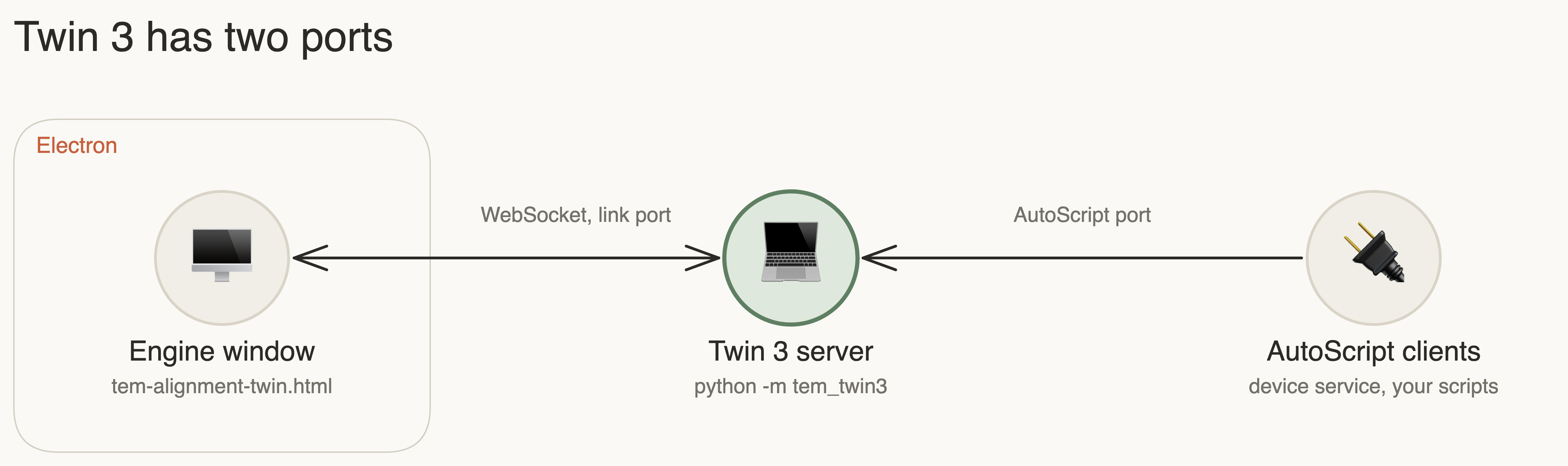
Twin 3 keeps its simulation inside its web page, not in the Python server. Two facts follow:
- A second page would be a separate simulation, not a second view of this one.
- Closing the page would end the simulation.
So the app owns one window for the whole run:
| Action | What happens |
|---|---|
| Close the window | It hides. The simulation keeps running, with background throttling off. |
| Open it again | The same window and the same simulation |
| Stop digital twin | The server and window end, and the simulation state is lost |
| Quit the app | Same as stop |
| The page crashes or is destroyed | The server stops, an error shows on the Digital twin page, and the next open starts a new simulation |
The controller is desktop/twin.mjs, with behaviour pinned by
desktop/tests/twin.test.mjs.
Using it from Python
Any AutoScript client can connect. The app chooses the port for each run, so read it from the running process or use the device tools through the assistant.
from autoscript_tem_microscope_client import TemMicroscopeClient

microscope = TemMicroscopeClient()
microscope.connect("localhost", 7524)   # the twin; a real Talos uses its own host and port 7521
print(microscope.service.system.name)
Twin-only calls reveal the hidden state, which is useful for benchmarks:
config = microscope.service.autoscript.server.configuration
config.get_value("twin.randomize=42")   # a new, reproducible misaligned column
config.get_value("twin.metrics")        # the true errors, as JSON
Measured on an Apple Silicon laptop, one step of changing a stigmator and acquiring an image takes about 0.13 s at 512 px and 0.19 s at 1024 px. The simulated exposure time does not add real waiting.
Limits in this app
- Python Workbench is off. The twin runs with
--no-workbench, because the Workbench executes arbitrary Python without a login. Its button on the twin page has no server, and features inside it, such as segmentation training, are unavailable. - The twin page keeps its own look. It is a dense instrument panel in English, and it is not themed with the rest of the app.
- The simulation is not saved between runs of the app.
- Twin results are not hardware results. A workflow that succeeds on the twin has not been shown to work on a microscope.